Label design · print queue · ERP integration
Design the label once.
Print it right, every shift.
spooler is a browser-based label designer with a controlled print queue behind it. Tags and live dates fill in at print time, an operator releases each job to a Honeywell or Zebra printer on your floor, and your ERP can queue work with a single JSON call.
Priced per printer · unlimited users · your existing labels import · read the manual
The designer
A real canvas, real barcodes, no desktop licence
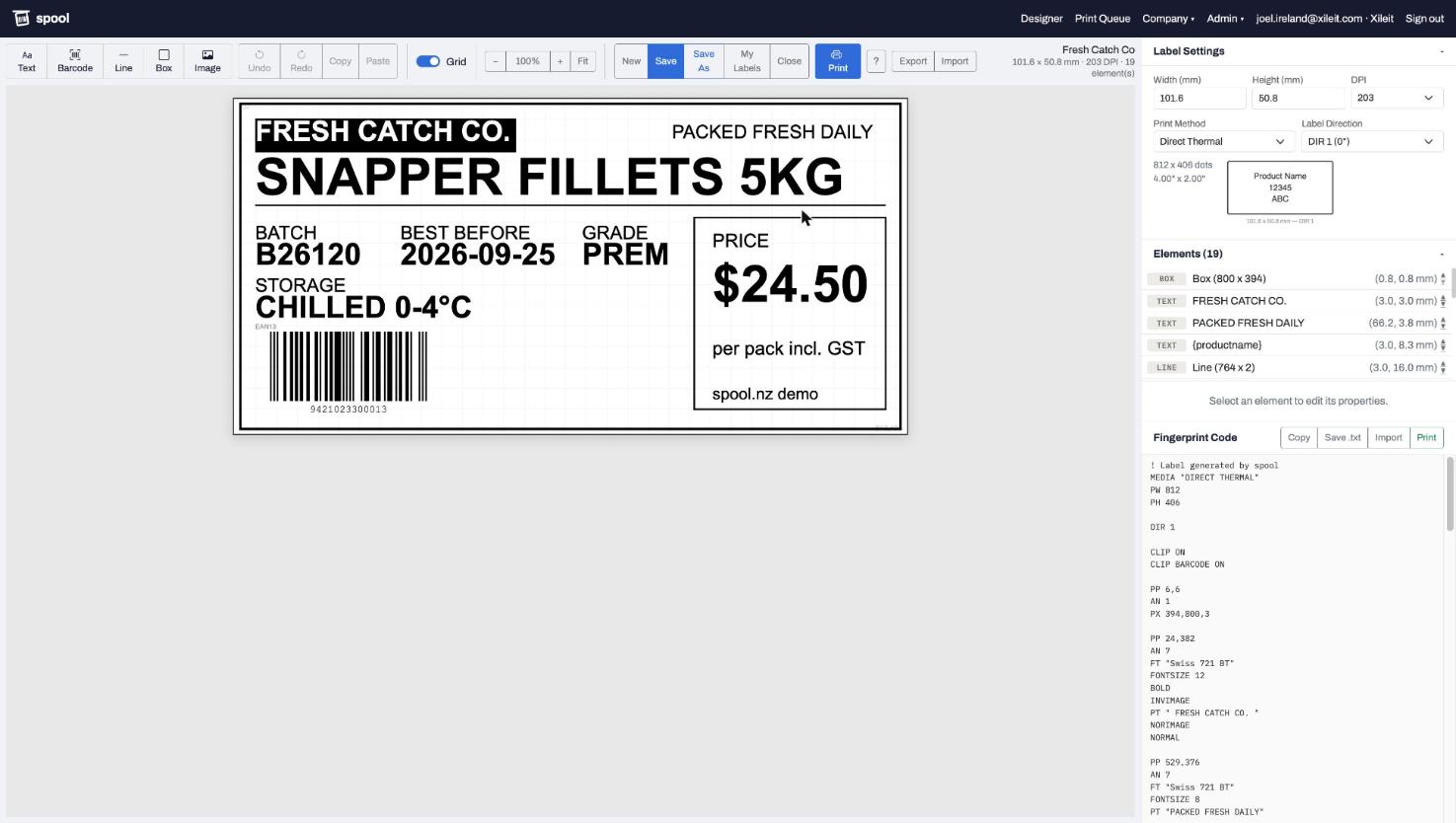
Lay out text, barcodes, lines, boxes and logos on a canvas that shows the label at true proportions. Barcodes render from your actual data, so an EAN with a bad digit shows up before it reaches the printer. Anchor points keep centred titles centred and right-aligned prices right-aligned as the content changes. Every save keeps a version.
- Code 128, Code 39, EAN, UPC, ITF, QR, Data Matrix, PDF417
- Printer-resident fonts for Honeywell and Zebra, mapped automatically
- Version history, undo, align and distribute, a shared library with folders
The print queue
Nothing prints until someone at the printer says so
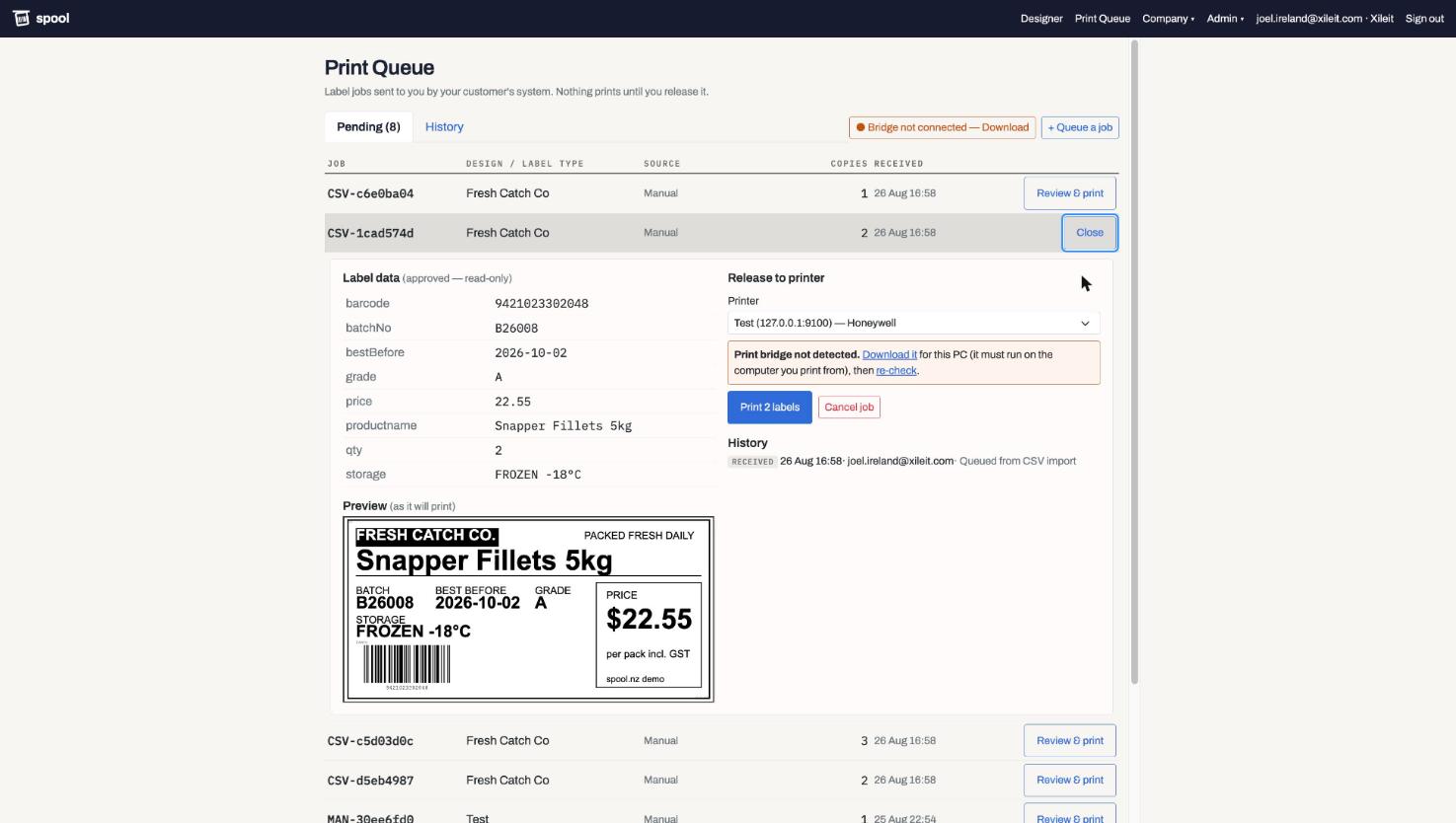
Jobs arrive from your systems, from spreadsheets, or by hand, and wait. The operator opens one, sees the exact label with the real data in place, picks the printer and releases it. When SAP drops three hundred jobs at once, Print all releases them oldest first, each one still recorded on its own. Reprints need a reason. Everything is audited: who, when, which printer, how many.
- Preview of the finished label before anything hits paper
- Cancel, restore, reprint with a reason, full history per job
- Sites: each location sees its own queue and printers
Print stations and the Floor view
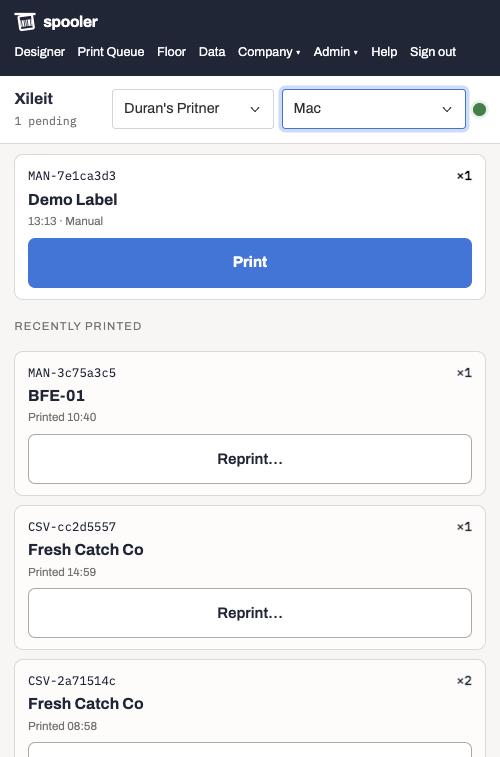
Release from a tablet at the printer. Nothing to install on it.
Connect the PC that runs the Print Bridge once and it becomes a print station that stays connected to spooler. From then on any signed-in device can release jobs to its printers: the tablet by the packing line, an operator's phone, a PC with no bridge. The connection starts inside your network, so nothing is opened inbound.
- The Floor view: one column of jobs, big Print buttons, tap to see the label, reprint with a reason
- Stations show online or offline live; a switched-off station's jobs simply wait
- USB printers are homed on their station and can be set up from any device
Choosing a design
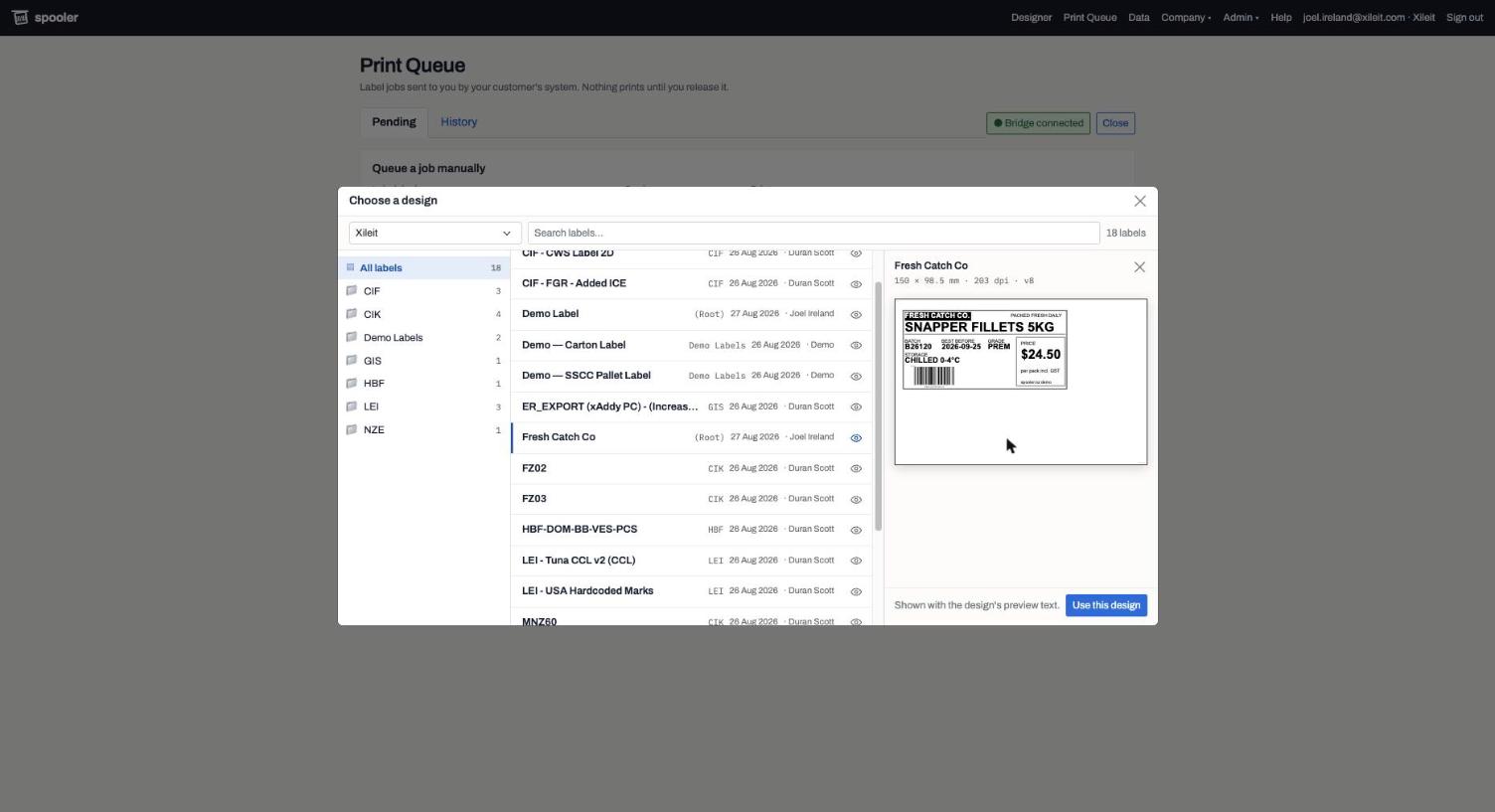
Pick by look, not by filename
Operators don't always know a design's name. The picker shows your folders, searches the whole library, and previews any label as it will print before it is chosen. The same library feeds the designer, the queue and the API, so there is one set of approved designs, not a folder of files on someone's PC.
How data gets onto a label
Three kinds of tag, one print engine
Whatever creates the job, the same rules fill the label. That is what lets a design be written once and printed from the queue, a spreadsheet and your ERP without three versions drifting apart.
{batch}
Data tags
Filled from the JSON field, spreadsheet column or queue box of the same name. Write {palletNo+} and it counts up once per copy: PFP000001, PFP000002…
@date(dd MMM yyyy, +14d)
Live dates
Stamped at the moment of printing, in the operator's time zone, with formats and offsets. Or count from a date in your data: {packed+14d}.
POST /api/print/jobs
Your ERP's fields
One flat JSON object. Every field becomes a tag; transactionId makes re-sends update rather than duplicate; release: true prints now through a station. Supplier keys route one system's jobs to many companies' queues.
The whole integration is this call
No SDK, no middleware, no file drops. Your system posts the data it already has; the job appears in the right site's queue with the design filled in, and waits for an operator. Or add "release": true and it prints immediately through a print station, with the result in the response. Status and cancellation are a GET and a DELETE away.
curl -X POST https://YOUR-WORKSPACE-DOMAIN/api/print/jobs \
  -H "X-Api-Key: lvk_…" \
  -d '{
    "transactionId": "ASN-10042",
    "labelType": "Carton 4x2",
    "copies": 3,
    "site": "Whakatane",
    "product": "Hoki Portions 1kg",
    "batch": "B26000",
    "packed": "2026-09-05",
    "release": true
  }'
Moving from BarTender, NiceLabel or Loftware
Bring your formats without the file format
Your existing software cannot export its designs, but it can print them. The Print Bridge poses as a printer: print each format to it once and it lands in the designer as an editable label, with the fields you tagged already tagged. Zebra ZPL and Honeywell Fingerprint both import, pasted or captured.
How the capture works →Built for a label floor
The right people can do the right things
Roles that match the work
Operators release jobs and nothing else. Managers add printers. Admins design. Owners run the team and the API keys. An Operator can be allowed to queue jobs without gaining anything else.
Sites for multi-location companies
Head office designs once. Each plant or store sees its own queue, printers and saved data. API jobs route to a site by name; unknown names are rejected rather than misrouted.
Printers that just work
Network printers by IP, USB printers by the name Windows gives them, both through one small bridge that installs as a Windows service or a macOS menu bar app. Enrol it as a print station and every device in the company can print through it. Nothing leaves your network on the way to the printer.
An audit trail you can hand to QA
Every print, reprint, cancel and restore records who, when, which printer, how many copies and why. Data edits and team changes too.
For resellers and integrators
Offer it under your own name
Your domain, your logo, your accent colour, your support address, on the sign-in page, in the app and in every email your customers receive. A partner portal to create customers, invite their owners and set printer licences.
See it with your own labels
Import a label, print a test, and decide with a real one in your hand. Plans are priced per printer; see pricing.
Request an account